Imagine the following scene in your company: your sales team is closing meetings, scheduling product demos, or programming delivery windows. Since Hubspot doesn't have a native field exclusively for "Time" (only date or combined date and time, which can sometimes be cumbersome), you decide to create an open text field. At the end of the month, you try to automate a reminder email for your clients and find a disaster in your database. One salesperson wrote "10am," another put "at ten," another "10:00," and yet another "around 10:30." Your automation breaks, the client receives a confusing email, and your operations team panics.
To eradicate this problem at its root, today we bring a practical case of custom rules in a Hubspot field to limit formats. At Hanbai, through our RevOps Boost vertical, we see daily how companies dirty their own CRM due to lack of data validation. We solve this pain point by transforming chaotic text fields into strict properties that educate the user in real-time, ensuring that your database is a precision engine and not a digital dump.
The cost of free text and why you need this practical case of custom rules in a Hubspot field to limit formats
Allowing salespeople to write at their free will in a CRM is scalability's number one enemy. According to B2B data quality metrics, 35% of failures in marketing and sales automations stem from human errors when entering non-standardized formats. If data doesn't have a predictable format, artificial intelligence can't read it, and your workflows fail.
The practical case of custom rules in a Hubspot field to limit formats arises from a real need. A client company (let's call it Company X) urgently needed to record the "Visit Time" in isolation to synchronize it with their logistics ERP. Being a single line text field, the chaos was absolute. The solution wasn't to buy expensive integrations but to leverage the hidden power of regular expressions (Regex) within Hubspot's native validations.
"A CRM without validation rules is like a highway without painted lines: sooner or later there will be an accident. Forcing data to be perfect from the moment it's typed is the greatest productivity 'hack' a RevOps team can implement." — Marta Sanchez, RevOps Manager at Hanbai.
4-step solution: practical case of custom rules in a Hubspot field to limit formats
Moving from chaos to millimetric accuracy requires setting up your CRM to actively reject human error. Here's how we implemented this flow for Company X, forcing salespeople to use the 24-hour format (HH:MM):
- Creation of the base property: in Hubspot settings, we created a new contact (or deal) property by selecting the "Single line text" field type.
- Activation of validation: in the property's rules tab, we activated the custom rules option.
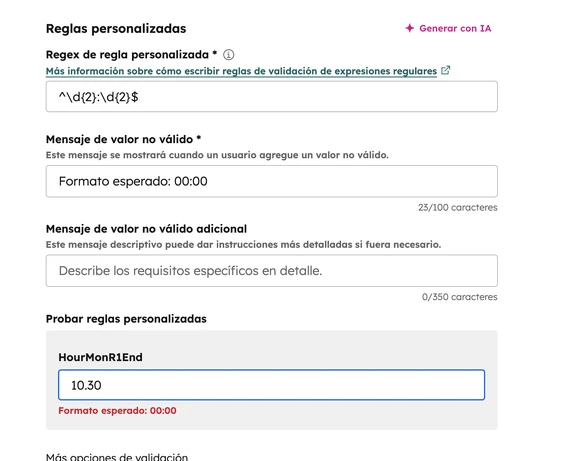
- Injection of the Regex pattern: here's the magic. We selected that the text must match a regular expression. For the time, we entered the pattern
^\\d{2}:\\d{2}$. (A small RevOps trick: you don't need to be a programmer for this; nowadays, you can ask AI tools like ChatGPT to generate the exact Regex formula you need). - Setting the error message: we established a clear alert message, for example: "Incorrect format. Please use the 24-hour format (example: 09:30 or 14:00)".
From that moment on, if a salesperson tries to save the record by writing "10am," the CRM simply won't let them proceed and shows the error in red. The process is bulletproof.
Frequently asked questions about data validation in Hubspot
When proposing these restrictions, sales directors often have operational doubts. To provide strategic clarity, here we answer the most common questions:
What exactly is the regex format and do I need to know how to program to use it?
Regex (Regular Expressions) is simply a text pattern search language. As we've seen, you don't need to know how to program. Just understand the logic and rely on modern tools to generate the formula. The pattern ^\\d{2}:\\d{2}$ simply tells the system: "require exactly two numbers, followed by a colon, followed by another two numbers".
Why not just use a dropdown menu with all the hours?
Creating a dropdown menu with 5 or 10-minute intervals (09:00, 09:05, 09:10...) would generate a kilometer-long list of options. It would make the salesperson waste time scrolling endlessly. The text field with Regex rule is infinitely faster for the user who types, but just as safe for the database.
How does this affect CRM adoption by salespeople?
Initially, there may be some slight friction ("the system won't let me save"), but after two days it becomes muscle memory. By eliminating ambiguity, the team gains confidence, knowing that the information they send to other departments is always accurate.
Why Hanbai's RevOps Boost vertical is your strategic ally
Knowing there is a "custom rules" button is information; knowing when, how, and why to apply it in each department of your company is business intelligence. At Hanbai, we are not simple software installers. We are architects of your revenue.
We understand that behind a "simple time field" there is a logistical operation or a key meeting that cannot fail. We audit your Hubspot instance to detect where the quality leaks in your data are and build the invisible architectural barriers that ensure your information is always an asset, never a liability.
Conclusion: artificial intelligence demands clean data
In 2026, if you dream of implementing predictive artificial intelligence for your sales, automating 100% of your follow-ups, or having impeccable financial reports, you need to start with the basics: data hygiene.
Educating your CRM to only accept perfectly formatted information is not about being controlling; it's about being efficient. It's time to stop cleaning data by hand at the end of the month and start building systems that protect themselves from minute one.
Is your database full of inconsistent formats that break your reports and automations?
Don't scale alone, accelerate with the expert team that already dominates your market.